Table of Contents
⚠️ When to use this guide
If your EagleEye deployment fails or you need to delete the instance and deploy from scratch, you must manually clean up the App Registrations created as part of the deployment process.
Important: This guide does NOT apply to standard updates of EagleEye. Only follow these steps if you are completely redeploying a new instance.
Deleting the EagleEye Resource Group is not enough. The App Registrations exist in your Entra ID (formerly Azure AD) and must be removed separately to avoid conflicts.
1. Locate the App Registrations
- Log in to the Azure Portal.
- Search for App registrations in the top search bar and select it.
- Click on the All applications tab.
- In the search box, type
SSW.EagleEye.
Note: If you don't find these apps in All applications, it means your previous deployment failed before reaching their creation part in the deployment process or failed at their creation part. You may find only 1 app, 2 apps, all 3, or none at all. Ensure you delete any that exist.
2. Delete the Specific Apps
You may see 3 specific applications created by the EagleEye deployment:
- SSW.EagleEye.Engine
- SSW.EagleEye.Portal
- SSW.EagleEye.Api
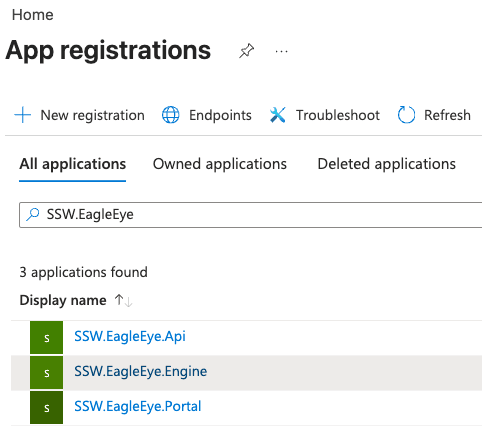
For each of these 3 applications:
- Click on the application name to open it.
- Click the Delete button in the top menu.
- Confirm the deletion when prompted.
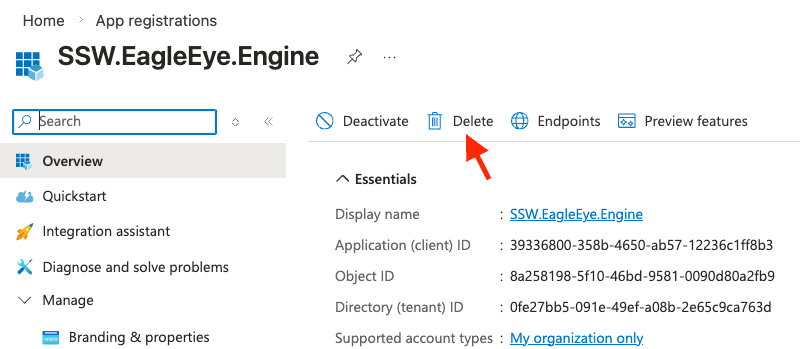
Warning: Ensure you have deleted all the apps that were created: Engine, Portal, and Api.
3. Keep the Master App
You do not need to delete the Master App for redeployments (created in Step 2 of the installation process).
- You can reuse the existing Client Secret from the Master App for your new deployment if it has not expired.
- If the Client Secret has expired, do not delete the Master App. Instead, simply delete the expired secret within the Master App and create a new client secret as per Step 2 - App Registration.
Once these steps are complete, you are ready to proceed with a fresh deployment of EagleEye.